

1-866-357-7422724 N 1st Street, Suite 200 St. Louis, MO 63102

Digital Content Marketing Blog

 / Digital Content Marketing Blog (Page 49)

You are working on reporting for a client and you open Google Ads to look at the conversions for the last 30 days, the cost per conversion, etc. You then go look at All Conversions by going to the tools section, measurement then conversion expecting to find the conversions you set up. But instead, you find these new Google Hosted local actions that are generating a higher number of conversions.


If you’re like most digital marketers, you were in that situation and found these new conversions in your Google Ads account. Sure, the more conversions are great but if they aren’t an accurate representation of the work you are doing, you probably don’t want them being reported on.


That’s the position we found ourselves in, however, we have not successfully found a way to remove these without contacting Google support OR even figured out how to get these conversions to show up for all of our accounts. So that leads me here, writing this blog on how I think these might show up in some accounts but not all and what they mean.


Here is Google Ad’s explanation on what each of these conversions means https://support.google.com/google-ads/answer/9013908?hl=en


Depending on the company, some of these conversions will be more helpful to you than others. For us with B2B, the only one of these local actions we would justify as “accurate” and “relevant” is website visits.


After a lot of digging, I found that the accounts with these Google Hosted local actions (sometimes) only show up if their Google My Business is linked with their Google Ads as a local extension.


The accounts showing these Google hosted conversions were linkedin Google My Business under linked accounts.
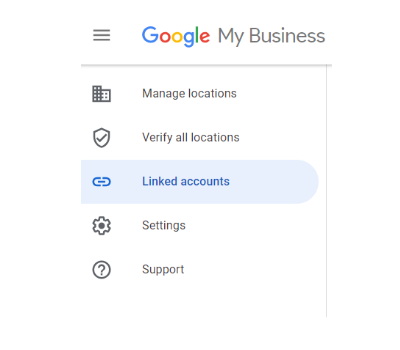
Google My Business Linked Accounts Linking Accounts

Be careful, because even if you think the accounts are synced, they may not be linked. After adding a local extension for an account, that business showed up in this section. BUT, still do not have the Google hosted conversions showing up in the Google Ads account. *eye roll*


So here we are. Still reading forums and asking questions to try and figure out how these conversions show up in some accounts and not others and how or if they can be removed.


These are the things that keep marketers up at night am I right?!


Call Us at 314-736-4434

Or Submit your information below


    Do you know your target customer?  I mean REALLY KNOW who that customer is?

    It’s very likely that you actually do, but the issue with ROI for most businesses when running ad campaigns online is that they don’t know how to target those customers online.

    85% of B2B Marketers say they know their target buyer, but only 60% are confident in knowing what or how to get in front of them online.


    Here we’re going to talk about the specifics of how to ensure your B2B Ad Campaigns are successful and a big part of that is your targeting.


    Let’s explore how to effectively target these customers and how to identify what content to create and use when running these ad campaigns.


    B2B Ad Campaign Targeting

    Ensuring you are getting in front of the right people.

    You’ll see higher ROI, eliminate wasted ad spend and have something that actually works!


    Listed below is our recommended approach for a B2B ads targeting model.


    LinkedIn

    • Defined Demographics (geo, age, sex, job title, etc.)
    • List(s)
      • Customer Email List
      • Leads Email LIst
    • Retargeted Website Visitors


    Facebook

    • Defined Demographics (geo, age, sex, job title, etc.)
    • List(s)
      • Customer Email List
      • Leads Email LIst
    • Retargeted Website Visitors
    • 1% Lookalike Audience(s) *after you’ve found a message / offering that works


    Google Ads

    • List(s)
      • Customer Email List
      • Leads List
    • Retargeted Website Visitors
    • Retargeted Website Visitors
    • Similar Audience(s) *after you’ve found a message / offering that works


    It’s important to note that using audience expansion targeting is not recommended until you’ve found a message and offering that works.  This will ensure you don’t waste ad spend as you grow outside of the most accurate targeting options.


    How to Identify What Content to Create for B2B Buyers

    This is extremely critical to the success of your campaigns.

    In most cases B2B companies know what their customers need and are looking for.

    And again most of the time you can just create that content. (you need part X and we have part X, let’s work together)


    But you can only say that so many times before people start ignoring it.


    Do this to find new content that will get your customers thinking about you and buying from you more often.

    • Do Keyword research using Google Keyword Planner, SEMRush or the MOZ keyword tool
    • Use that keyword research to look at publications, Quora,Social Media and Reddit to find the questions and answers being asked and given in the marketplace
    • Write posts, articles, white papers or make videos on those keywords, questions and answers


    Doing these two things will give you exactly what you need to get more traffic, phone calls, leads and more sales!


    Learn more B2B Content Marketing Strategies & Tactics here: https://acumenstudio.com/b2b-content-marketing-agency/


    Call Us at 314-736-4434

    Or Submit your information below

     

      Google Plus social network will be shutting down soon from security issues and lack of use. Google Plus has been around for seven long years. When Google Plus first came out Google had employees use it and wanted them to encourage others to use it.  Google+ even influenced search results to get more people to use it. For a short time the more +1s a company received the higher their rankings started to climb, until Google slowly stopped pushing Google+ then less Googlers were posting on Google+. Some people liked Google Plus and others absolutely hated it causing a slow death to Google Plus.


      Google Plus Data Breach Killed It

      Google Plus data breach was the final straw in killing the Google+ platform.  Here’s how it happened, in 2018 Google started Project Strobe reviewing third-party data access and privacy controls. Project Strobe discovered users were not using Google+ and discovered data privacy issues with APIs. That’s when Google discovered the bug and patched it right away. However, they still covered it up and never told anyone until later. This affected 500,000 Google+ accounts with 438 applications using the APIs. Although, Google didn’t find any evidence of Google+ user data being abused they decided to end Google+ and put it to rest.  


      Project Strobe top four findings are:

      1. Consumer Expectations and maintenance. Google+ wasn’t meeting consumer expectations and the challenges of Google+ APIs were complicated.
      2. Consumers wanted more control over the data they share. Google is implementing more control over access. Instead of one screen of requested permission we will start seeing separate requests for each one.
      3. Consumers didn’t like granting access to apps to their data.  It’s finally happening, not all apps will be able to get your information. Google is limiting the amount of the apps that can get permission to your Gmail information. Apps that enrich email will be the only ones authorized to get your data. This includes email clients, backup services and email productivity services from mail merge and customer relationship management systems.  
      4. Call Logs and SMS permissions limited on Android devices. Android Contacts API will no longer be able to get your contacts list information.


      Google+ Was Slowly Dying Before The Security Breach

      Google+ was already dying way before the security breach.  Google+ consumer engagement and usage dropped with most sessions only lasting five seconds or less. Most people argue that Google+ is designed for Google and not the consumers. Google+ was dying, but the final death of Google+ was the security breach the bug that ended it all. Maybe, Google has something better up their sleeve time will tell.


      Call Us at 314-736-4434

      Or Submit your information below